


一键生成高质量 AI 简报:n8n 工作流最佳实践 #
一、简介 #
- n8n 是一款开源的低代码工作流自动化工具,专注于将各种应用和服务连接起来,形成自动化的业务流程。它提供了超过400个预置集成,覆盖各类SaaS服务和数据库。既可以通过简单的拖拽操作构建工作流,也可以通过js或Python代码进行更复杂的定制。
- 支持Docker私有化部署,完全不吃配置,1核1G的服务器应该都能跑。
- 适合人群: 需要高度定制自动化流程的团队、开发者、以及追求效率最大化的中小企业。
- 可以个人或者企业内部但是不能外部商用,商用推荐 dfly
- 官网:https://n8n.io/
二、部署 n8n #
- 准备一台已安装 docker 的 1h1g 以上的服务器、nas 或者本地电脑
- https://github.com/n8n-io/n8n
# 创建数据存储卷
docker volume create n8n_data
# 后台运行n8n服务,--rm 如果有改容器就会删除
docker run -it --rm --name n8n -p 5678:5678 -v n8n_data:/home/node/.n8n docker.n8n.io/n8nio/n8n- docker启动后本地电脑使用http://localhost:5678, 服务器用 http://ip:5678
三、汉化 #
- 汉化包:https://github.com/other-blowsnow/n8n-i18n-chinese/releases
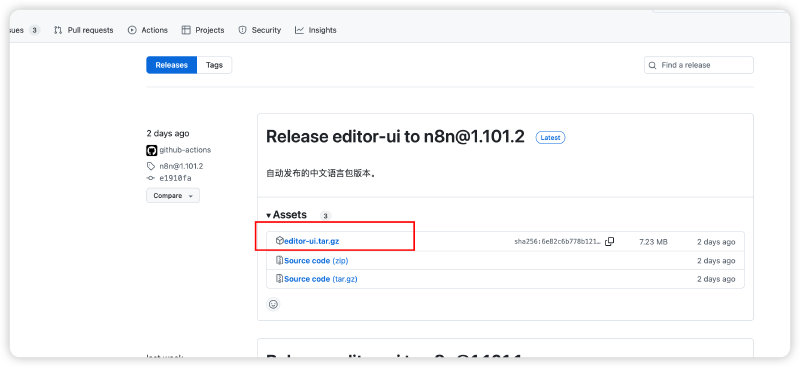
- 如果有汉化需求可以参考该github项目 readme 操作
四、jina-reader 部署 #
- 本文采用 jina reader 来爬取网页文本。Jina Reader 是基于网页抓取、内容清洗、自然语言处理等技术,确保提取内容的准确性和结构化,能够将网页内容转换为适合 LLM 处理的纯文本格式,支持多种输出格式。
- 网址:https://jina.ai/
- 计费:免费用户每个账号可以获取 10,000,000 个 token,当然也可以自己部署。
- 准备 1h1g 服务器即可运行,当然配置越高支持的并发越高。
- 采用 docker 部署,执行下面指令
- 部署完成后,可以用下面指令试下效果
curl -H "X-Respond-With: markdown" 'http://localhost:3000/https://www.baidu.com'五、AI 简报工作流实战 #
5.1 提前准备 #
-
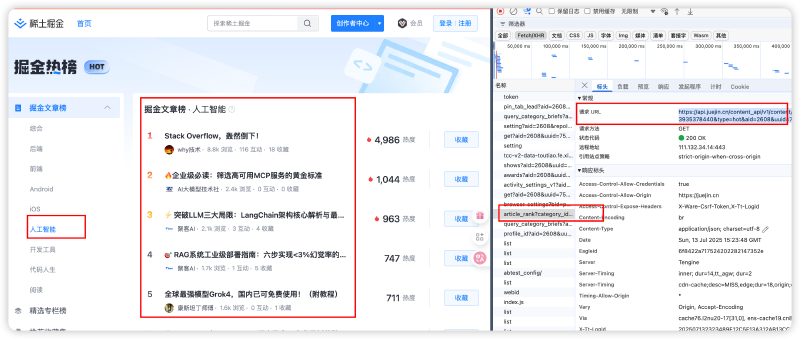
目标:定时从掘金人工智能热榜取榜单,并用 jina reader 抓取正文,然后用大模型总结成新闻简报,最后推送到邮箱
-
数据源:https://juejin.cn/hot/articles/6809637773935378440 打开调试台获取榜单api
-
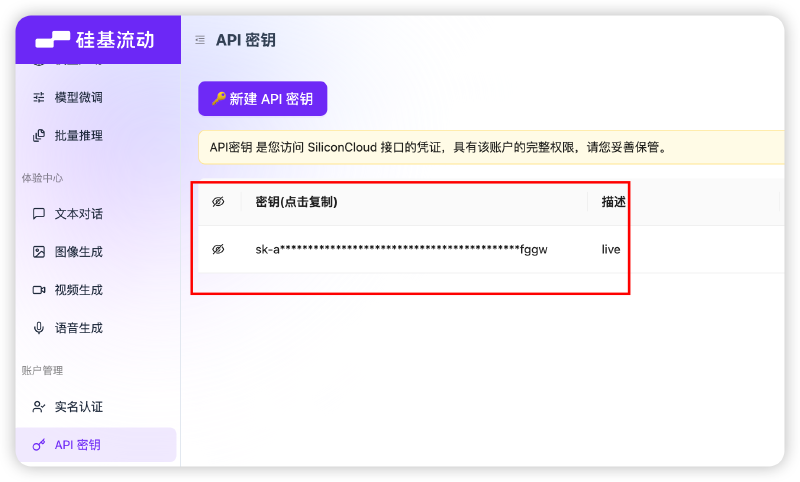
大模型:使用硅基流动 api,新用户有一定的额度,在下面 API 密钥复制密钥,后续会用。
-
jina reader: 如上图所示
-
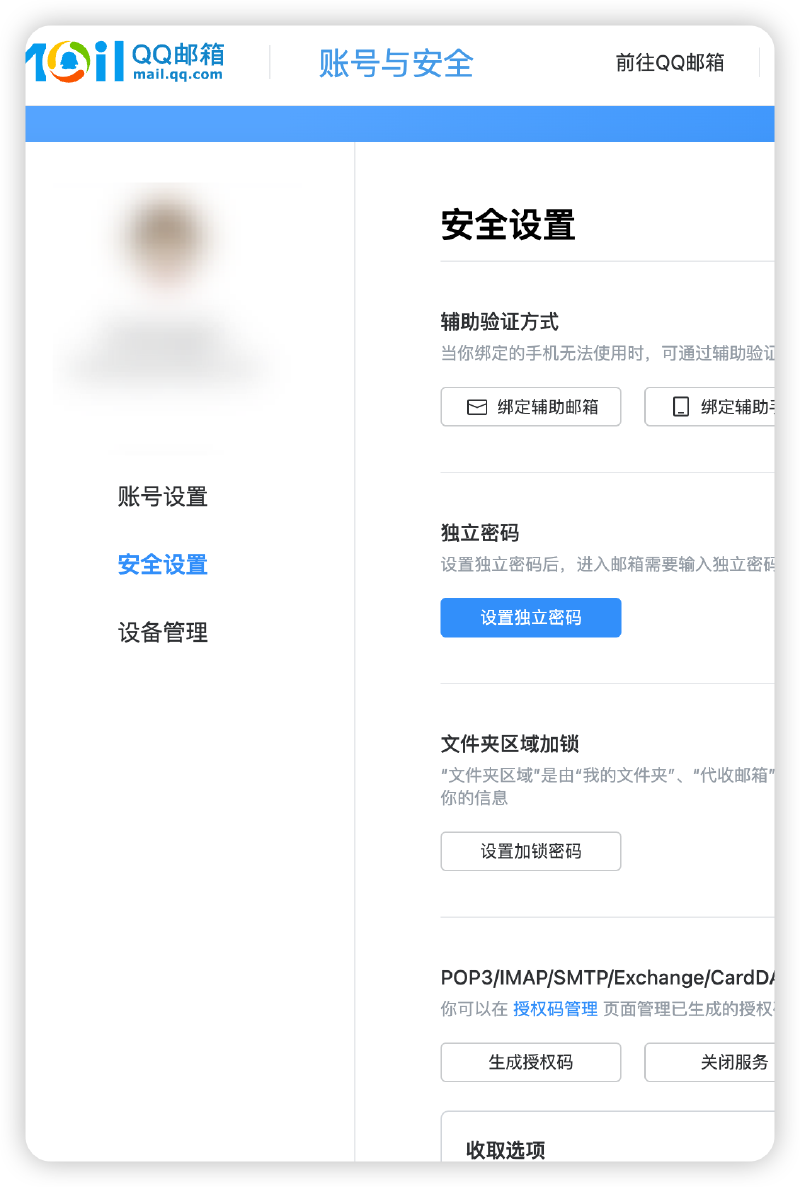
qq 邮箱授权码:qq 邮箱网页版→设置→ 账号与安全→安全设置→生成授权码→短信验证,获取授权码
5.2 流程实现 #
-
打开n8n,新建一个 workflow,点右上角+新增节点
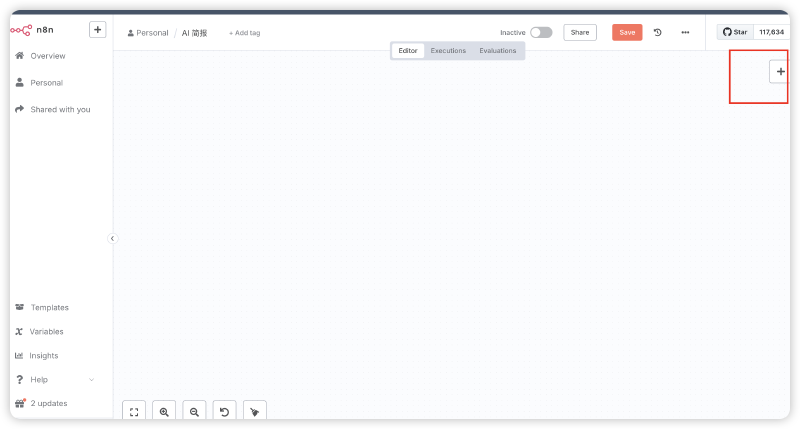
-
触发方式:n8n 支持非常多的工作流触发方式,先选第一个手动触发,方便调试,工作流建好后换成定时,比如每天 8:00 am
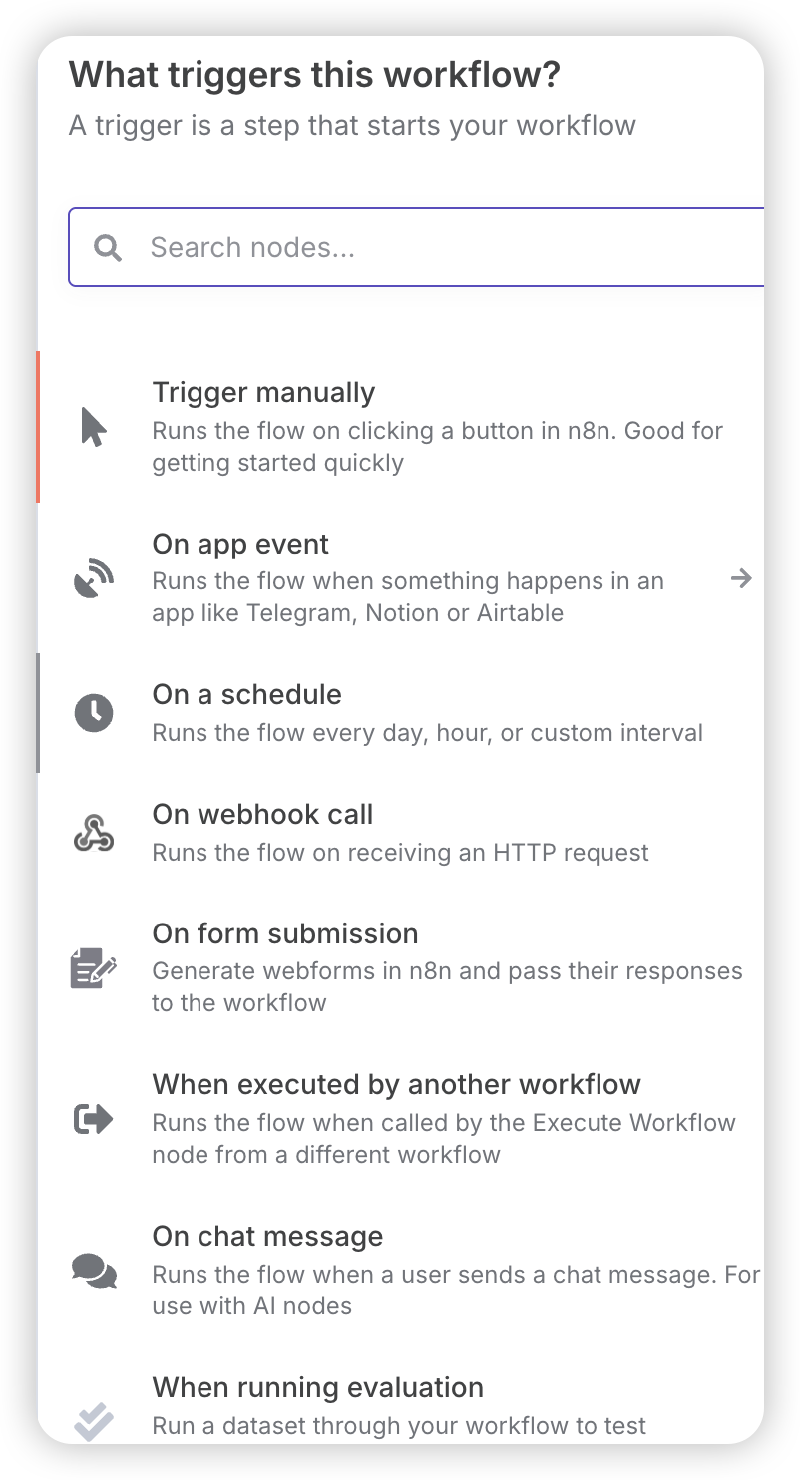
-
抓取 AI 热榜:选择 http request 拉取热榜数据,如下两张图,URL 填:https://api.juejin.cn/content_api/v1/content/article_rank?category_id=6809637773935378440&type=hot&aid=2608&uuid=6963437645070976542&spider=1
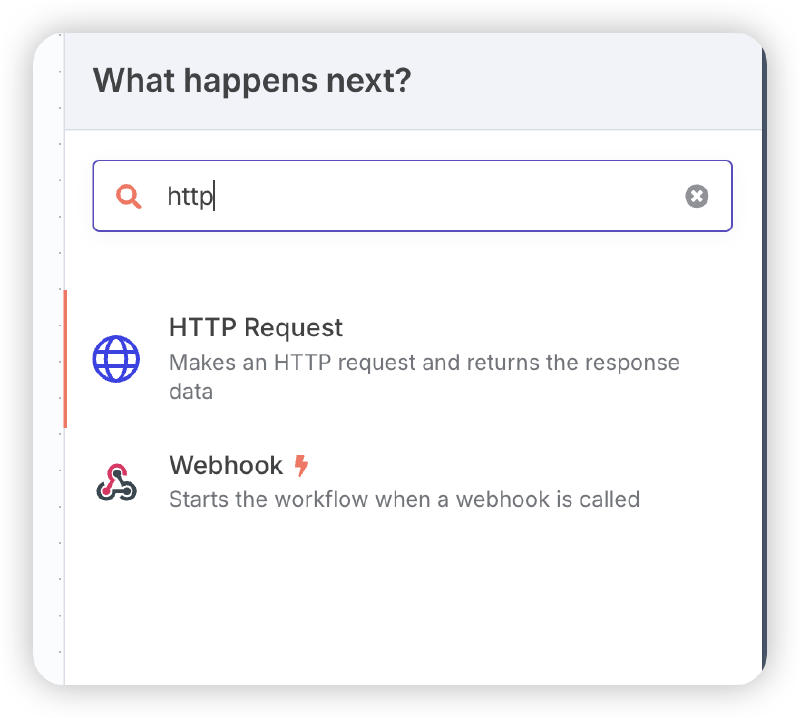
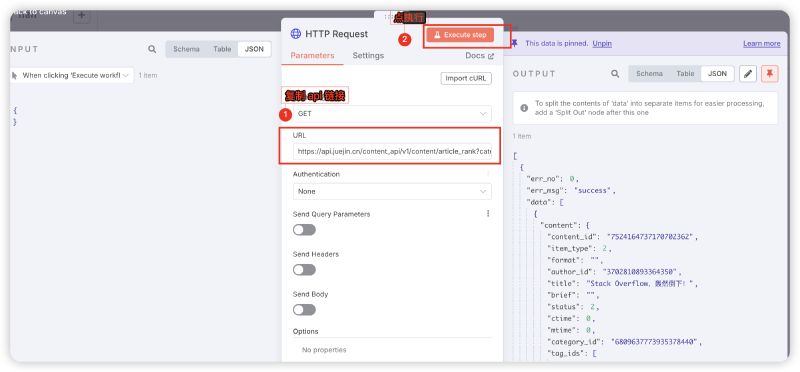
-
Split Out 节点:把 data 数据拆成 20 个 items
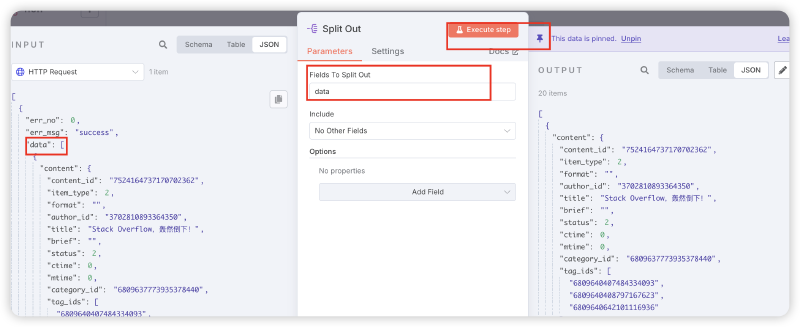
-
Limit 节点:这里填 5 条,可以根据个人偏好选择条数

-
爬取正文:添加 http 节点,URL填:

http://localhost:3000/https://juejin.cn/post/{{ $json.content.content_id }}- http://localhost:3000 换成jina reader 链路
- {{ $json.content.content_id }} 文章 id
-
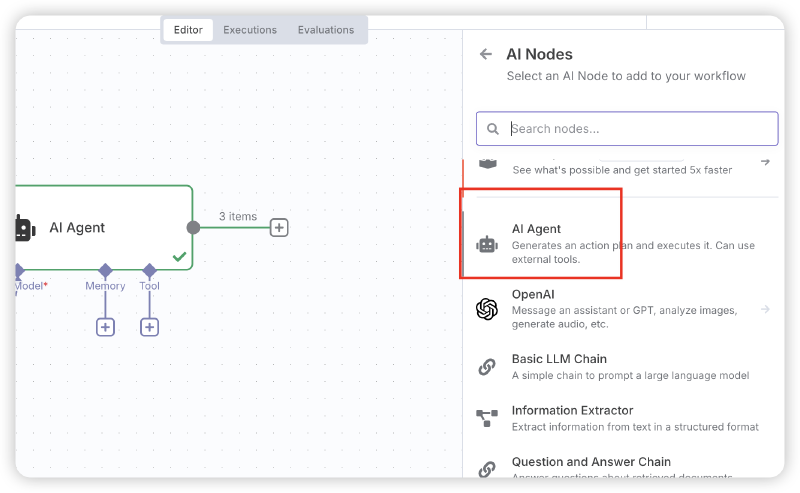
大模型总结:1)AI→AI Agent 点开AI Agent,在Source for Prompt (User Message) 选择 Define below;在Prompt (User Message) 拖左边 input 的 data 拉过来;在Options 加一个System Message,见 6.1。不用管循环,n8n 会自动处理循环。

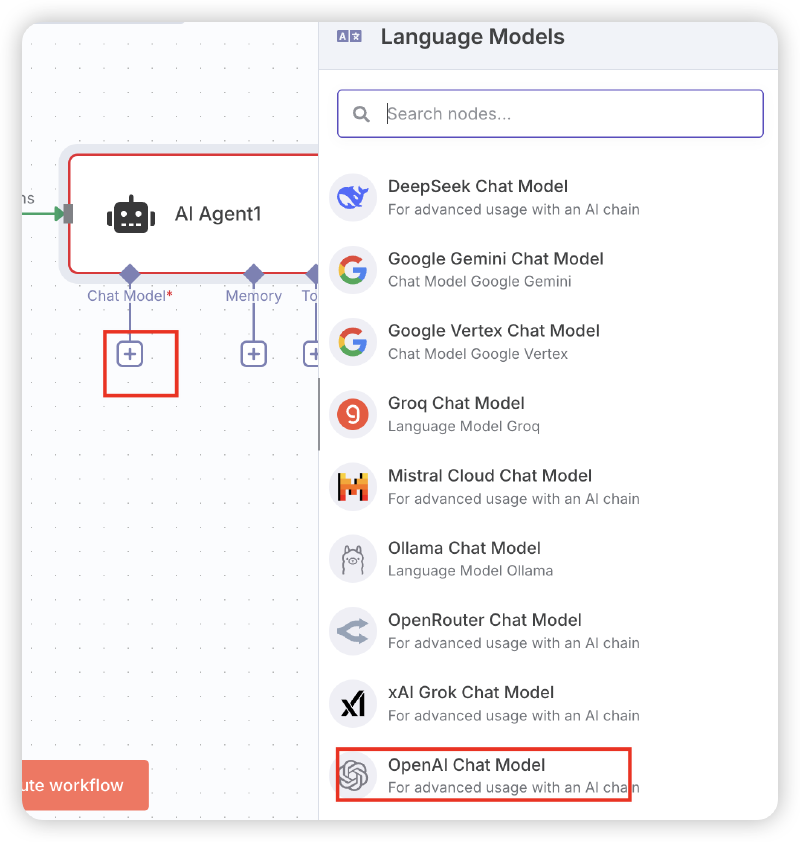
2)AI Agent 中加 Chat Model:可以用最下面的openai chat model。api key和 base-url 使用硅基流动账号。
-
格式处理:第 6 步要求大模型输出 json,但是很多时候并不能完全按照要求输出,可以对输出格式化处理。选择 code 节点,Language选择 JavaScript,脚本如下:

// 提取并解析每个 output 中的 JSON const result = $input.all().map(item => { // 移除可能存在的 markdown 代码块标记 let jsonStr = item.json.output.replace(/```json\n?/g, '').replace(/```\n?/g, '').trim(); // 解析 JSON 字符串 return JSON.parse(jsonStr); }); return result -
json to HTML:选择 code 节点,Language选择 JavaScript,脚本如 6.2
-
发送到qq 邮箱:添加 Send email 节点,凭证如下第二张图,Host使用 smtp 地址 smtp.qq.com,Port:465,Password 用之前申请的qq 邮箱授权码


5.3 成果展现 #
按照上面操作完成,点下面的执行工作流程,看执行效果

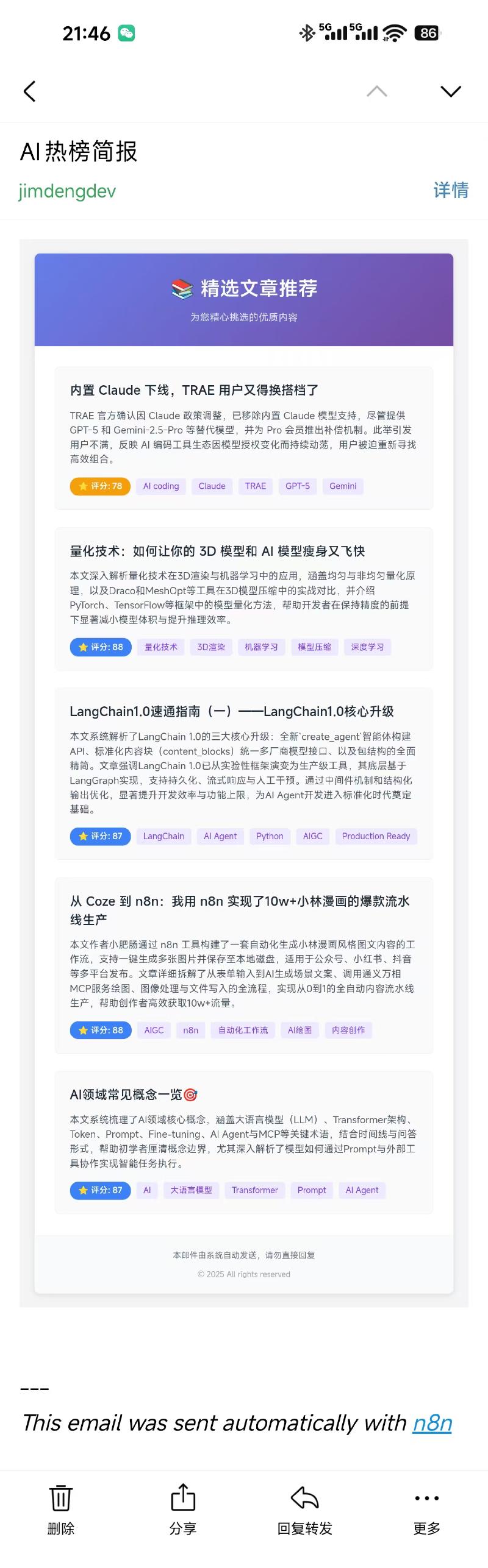
六、附件 #
6.1 LLM总结 system prompt #
你是一个擅长总结长文本的助手,能够总结用户给出的文章,请根据下方的文章内容做三件事:

1. **文章摘要**
   清晰、简洁地总结内容,在3-4句话内吸引读者。

2. **文章评分(1-100)-重要**
   严格评估文章内容,不考虑类别,但根据以下标准:

   - **重要性和影响(最高30分)**
     对公众有影响或具有长期政策影响的文章
   - **新内容和信息(最高25分)**
     提供新信息、新观点或深入背景的文章
   - **报道质量(最高25分)**
     写作清晰、有引用、有结构,不仅仅是报道文章
   - **报道的吸引力(最高20分)**
     生动有趣,有细节或与当前事件相关

   **立即扣分** 如果发现以下情况:
   - 广告/宣传文章(-20至-30分)
   - 内容陈旧、重复的新闻文章(-10至-20分)
   - 缺乏来源或使用模糊语言的文章(-10分)

3. **文章标签**
	 阅读文章内容后给文章打上标签,标签通常是领域、学科或专有名词,要求 2-5 个

---
文章内容:
{{ $json.data }}

---
输出格式:
请严格以JSON格式回答,需包含以下key:
{
  "title": "xxxx"
  "abstract": "xxx"
  "source": "https://juejin.cn/post/7560167720013692974"
  "score": "75"
  "tags": "AIGC,Python"
}
6.2 json转html #
function convertToEmailHTML(articles) {
  // 处理 tags,统一转换为字符串
  const formatTags = (tags) => {
    if (Array.isArray(tags)) {
      return tags.join(', ');
    }
    return tags;
  };

  // 根据分数返回不同颜色
  const getScoreColor = (score) => {
    if (score >= 90) return '#10b981'; // 绿色
    if (score >= 80) return '#3b82f6'; // 蓝色
    if (score >= 70) return '#f59e0b'; // 橙色
    return '#ef4444'; // 红色
  };

  const htmlContent = `
<!DOCTYPE html>
<html lang="zh-CN">
<head>
    <meta charset="UTF-8">
    <meta name="viewport" content="width=device-width, initial-scale=1.0">
    <title>精选文章推荐</title>
</head>
<body style="margin: 0; padding: 0; background-color: #f3f4f6; font-family: -apple-system, BlinkMacSystemFont, 'Segoe UI', Roboto, 'Helvetica Neue', Arial, sans-serif;">
    <table width="100%" cellpadding="0" cellspacing="0" style="background-color: #f3f4f6; padding: 20px 0;">
        <tr>
            <td align="center">
                <table width="600" cellpadding="0" cellspacing="0" style="background-color: #ffffff; border-radius: 8px; box-shadow: 0 2px 8px rgba(0,0,0,0.1);">
                    <!-- Header -->
                    <tr>
                        <td style="background: linear-gradient(135deg, #667eea 0%, #764ba2 100%); padding: 30px; text-align: center; border-radius: 8px 8px 0 0;">
                            <h1 style="margin: 0; color: #ffffff; font-size: 28px; font-weight: 600;">📚 精选文章推荐</h1>
                            <p style="margin: 10px 0 0 0; color: #e0e7ff; font-size: 14px;">为您精心挑选的优质内容</p>
                        </td>
                    </tr>

                    <!-- Content -->
                    <tr>
                        <td style="padding: 30px;">
                            ${articles.map((article, index) => `
                            <table width="100%" cellpadding="0" cellspacing="0" style="margin-bottom: ${index < articles.length - 1 ? '25px' : '0'}; border: 1px solid #e5e7eb; border-radius: 6px; overflow: hidden;">
                                <tr>
                                    <td style="padding: 20px; background-color: #fafafa;">
                                        <!-- Title -->
                                        <h2 style="margin: 0 0 12px 0; font-size: 18px; font-weight: 600; color: #1f2937;">
                                            <a href="${article.json.source}" style="color: #1f2937; text-decoration: none;" target="_blank">
                                                ${article.json.title}
                                            </a>
                                        </h2>

                                        <!-- Summary -->
                                        <p style="margin: 0 0 15px 0; color: #4b5563; font-size: 14px; line-height: 1.5;">
                                            ${article.json.abstract || '暂无摘要'}
                                        </p>

                                        <!-- Score and Tags in one line -->
                                        <div style="margin-bottom: 0; display: flex; align-items: center; flex-wrap: wrap; gap: 8px;">
                                            <span style="display: inline-block; background-color: ${getScoreColor(article.json.score)}; color: #ffffff; padding: 4px 12px; border-radius: 12px; font-size: 12px; font-weight: 600;">
                                                ⭐ 评分: ${article.json.score}
                                            </span>
                                            ${formatTags(article.json.tags).split(',').map(tag => `
                                                <span style="display: inline-block; background-color: #ede9fe; color: #7c3aed; padding: 3px 10px; border-radius: 4px; font-size: 12px;">
                                                    ${tag.trim()}
                                                </span>
                                            `).join('')}
                                        </div>
                                    </td>
                                </tr>
                            </table>
                            `).join('')}
                        </td>
                    </tr>

                    <!-- Footer -->
                    <tr>
                        <td style="background-color: #f9fafb; padding: 20px; text-align: center; border-radius: 0 0 8px 8px; border-top: 1px solid #e5e7eb;">
                            <p style="margin: 0; color: #6b7280; font-size: 12px;">
                                本邮件由系统自动发送,请勿直接回复
                            </p>
                            <p style="margin: 10px 0 0 0; color: #9ca3af; font-size: 11px;">
                                © ${new Date().getFullYear()} All rights reserved
                            </p>
                        </td>
                    </tr>
                </table>
            </td>
        </tr>
    </table>
</body>
</html>
  `.trim();

  return htmlContent;
}

// 生成 HTML
const emailHTML = convertToEmailHTML($input.all());
return {
  "output": emailHTML
}